
INFORMATIONS:
💻 Windows 10 x64 [ 20H2 – 21H1 – 21H2 – 22H1 – 22H2 ]
💻 Windows 11 x64 [ 23H2 – 24H2 ]
STEAM ONLY; DOES NOT WORK ON MICROSOFT VERSION
🎯 AIMBOT:
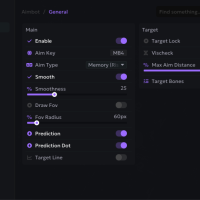
Targeting Options
Enabled – main toggle for aimbot functionality
Speed – adjustable aimbot speed from 0-100%
Field of View – adjustable targeting cone from 0-180 degrees
Max Distance – maximum targeting range from 0-500 meters
Retarget Time – delay before switching targets (0-1000 ms)
Detach Time – time before releasing target (0-1000 ms)
Filtering Options
Filter Invisible – ignore targets that can’t be seen
Draw Aimbot FOV – visualize the targeting field of view with customizable color
The right panel contains a hitbox selection interface that allows configuring which body parts to target.
🎯 TRIGGERBOT:
Targeting Options
Enabled – main toggle for triggerbot functionality
Hitbox Expansion – adjustable hitbox expansion size from 0-100%
Retarget Time – delay before switching targets (0-1000 ms)
Magnetic Triggerbot
Filtering Options
Filter Invisible – ignore targets that can’t be seen
The right panel contains a hitbox selection interface that allows configuring which body parts to target.
👁️ PLAYER ESP:
Main ESP Settings
Box – toggleable player outline box.
Head Dot – toggleable indicator for player’s head position.
Skeleton – toggleable bone esp with color customization.
Out of FOV Arrows – toggleable indicators for players outside screen view.
Distance – shows your distance to player – position can be changed to the place you want.
Name – displays player’s name – position can be changed to the place you want .
Visible – indicates player visibility status- position can be changed to the place you want.
Team – indicates player team – position can be changed to the place you want.
Draggable ESP system include. Config your ESP as you literally want.
⚙️CONFIG:
Configuration Management
Config Name Input – text field for entering new config names
Add Config (+) – button to create a new configuration
Config List – selectable list of saved configurations
Action Buttons
LOAD – load the selected configuration
SAVE – save current settings to the selected configuration
DELETE – remove the selected configuration
CLEAR – reset all settings to default
Miscellaneous Settings
Overlay FPS – slider to adjust overlay frame rate from 30-500 FPS
Developer Mode – toggle for developer features (only available in debug mode)