

Macku MAKCU Setup Guide 2026 — ESP32 Input Device Explained
What Makes Macku Different
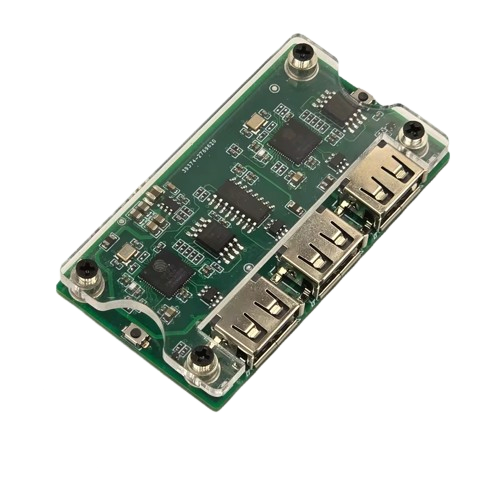
Macku is an input routing device built on the ESP32-S3 microcontroller—a powerful, dual-core chip that’s open-source friendly and widely available. Unlike KMBox (which uses proprietary routing hardware), Macku leverages off-the-shelf components. This keeps costs down without sacrificing performance. You get 1000 Hz polling, low latency, and full customization potential at a fraction of the price.
If you’re building a budget-conscious setup or want deep firmware control, Macku is the smarter choice. If you need enterprise-grade reliability and pre-built firmware, KMBox has the edge. For most detection research labs, Macku is more than sufficient.
ESP32-S3 Architecture and Dual-Core Design
The ESP32-S3 is an Xtensa LX7 based microcontroller with two processor cores running at 240 MHz each. One core handles USB communication and device enumeration. The other manages input polling and routing logic. This split allows Macku to handle high-frequency input events without blocking USB traffic—critical for maintaining that 1000 Hz polling rate.
The chip includes 512 KB of SRAM and 4 MB of flash storage built-in. That’s enough for custom firmware and behavior scripting without needing external storage. Compare this to KMBox, which is more rigid but also more battle-tested in production environments.
For detection research, the ESP32-S3’s flexibility is a huge advantage. You can write custom firmware in C or MicroPython, test it locally, and deploy it directly to the Macku board. No external tooling required; just a USB cable and an IDE.
1000 Hz Polling and Input Latency
Macku polls your keyboard and mouse at 1000 Hz—the industry standard for low-latency input devices. That means it checks your peripherals 1000 times per second, capturing every keystroke and mouse movement with a maximum latency of 1 millisecond.
In practical terms: when you press a key on your research PC, the Macku sees it and forwards it to the target PC almost instantly. The only latency you’ll observe comes from USB transport (negligible, microseconds) and processing overhead (also negligible on modern PCs).
This matters because some anti-cheat systems timestamp input events. Laggy input routing creates detectable timing anomalies. Macku’s 1000 Hz polling ensures your inputs are indistinguishable from native hardware.
UART Communication and Passthrough Firmware
Macku communicates with attached devices via UART (serial) as well as USB. This dual-interface design is a game-changer for advanced users. You can write custom tools that talk to Macku over UART while it simultaneously routes keyboard and mouse inputs.
Passthrough firmware is a common use case: Macku sits in the middle, monitoring all input traffic, logging or analyzing it, and passing everything through unchanged. You could implement auto-detection of specific key sequences, conditional input blocking, or even dual-input injection (sending commands to both PCs simultaneously).
KMBox supports custom firmware too, but the UART interface on Macku makes experimentation and debugging easier. You can see exactly what’s happening in real-time without desoldering chips.
Macku vs. KMBox: Head-to-Head
| Attribute | Macku (ESP32-S3) | KMBox (Proprietary) |
|---|---|---|
| Polling Rate | 1000 Hz | 1000 Hz |
| Input Latency | ~1 ms | ~1 ms |
| Network Support | No (USB/UART only) | Yes (NET version) |
| Firmware Customization | Open-source, full control | Custom but proprietary |
| Price | Budget-friendly | Premium |
| Learning Curve | Moderate (open, well-documented) | Steep (proprietary, less community) |
| Enterprise Support | Community-driven | Vendor-backed |
The bottom line: Macku and KMBox perform identically in standard use. The difference is price, customization depth, and support model. Macku is ideal if you want to hack firmware and stay on budget. KMBox is better if you need network routing, high-end customization, or you prefer vendor support.
HID Report Rate and USB Enumeration
Macku enumerates as a standard USB HID (Human Interface Device) to the target PC. Windows, Linux, and macOS recognize it as a keyboard and mouse without driver installation. This is critical—installing custom drivers on your target PC defeats the purpose of using a hardware-based router. Macku avoids that completely.
HID report rate is capped at your controller’s polling frequency—1000 Hz in Macku’s case. The USB 2.0 interface has plenty of bandwidth (480 Mbps full-speed), so the bottleneck is the microcontroller’s processing, not the bus. You’ll never saturate USB bandwidth with keyboard and mouse data.
Integration into DMA Detection Setups
A complete setup looks like this: DMA card in your target PC. Macku routing keyboard and mouse between your research PC and target. Fuser merging video output from both PCs.
Macku plays the same role as KMBox but costs less. The DMA Bundle includes Macku for exactly this reason—it’s the cost-effective input routing solution that doesn’t compromise on performance.
If you’re expanding your setup later and need network routing capability, you can add a KMBox NET without removing the Macku. Or replace the Macku with KMBox. Both devices are independent and interchangeable.
Setup and Installation
Plug your keyboard and mouse into Macku’s input USB port. Plug Macku’s output port into your target PC. Macku powers on automatically (it draws current from USB). Your target PC will recognize it as a standard keyboard and mouse—no drivers needed. Your research PC won’t see Macku at all; it only sees your physical keyboard and mouse.
Open DepShop’s Macku firmware tool on your research PC to configure routing behavior (if desired). The default out-of-the-box configuration routes keyboard and mouse to the target PC, which is what you want. Advanced configuration is optional.
Custom Firmware and Community Projects
Macku’s firmware is open-source and lives in GitHub. The community has built dozens of custom variants: dual-input injection, conditional routing based on window focus, macro recording and playback, and more.
The ESP32-S3 runs Arduino IDE compatible code, so if you know C, you can write firmware from scratch. MicroPython is also supported if you prefer Python. Flashing new firmware is as simple as plugging Macku into your PC’s USB and running the upload utility.
The DepShop Discord has a firmware library and an active development community. If you’re building something custom, post your idea there and get feedback before spending days on implementation. For DMA card firmware, DepShop also stocks custom DMA firmware for BE/EAC/ACE bypass.
Power Consumption and Thermal Considerations
Macku draws about 300 mA from the USB input port—well within the USB 2.0 specification (500 mA max for full-speed devices). It runs cool, with no active cooling required. Even in heavy use (continuous input routing), the ESP32-S3 stays well below thermal limits.
The board includes a small heatsink on the main processor, but thermal throttling is not a concern for input routing workloads. CPU usage is typically 2–5% on a typical research machine.
Security and Isolation
Macku is a hardware device with no network connectivity (unlike KMBox NET). It can’t be hacked over the network, updated remotely, or compromised by malware on either PC. This is a security advantage if you’re paranoid about isolation.
The firmware is open-source, so you can audit it for backdoors. This transparency is harder with KMBox’s proprietary design.
Troubleshooting Common Issues
If the target PC doesn’t recognize Macku’s USB output, try a different USB 2.0 port on the target machine. Some USB 3.0 ports have compatibility quirks. If Macku still isn’t recognized, the board may need a firmware update—check the DepShop Discord for the latest build.
If keyboard input works but mouse doesn’t (or vice versa), your mouse may need a firmware-level driver (for advanced gaming mice with extra buttons). Contact the Discord community; they’ve solved this before.
If Macku is causing USB enumeration delays on startup, try a powered USB hub. Passive hubs sometimes deliver insufficient power during the initial handshake. A powered hub solves this immediately.
When Macku Is the Right Choice
Pick Macku if you’re on a budget but don’t want to sacrifice performance. Pick it if you like tinkering with firmware and want full source code access. Pick it if you’re building a local dual-PC setup and don’t need remote network routing. Pick it if you’re in the DepShop community and want to benefit from shared firmware projects.
If you need rock-solid enterprise support, network routing (KMBox NET), or you prefer pre-built solutions, KMBox might suit you better. But for 90% of detection research labs, Macku is the optimal choice.
Macku in the Complete DMA Bundle
The DMA Bundle brings together the CaptainDMA card, a fuser for video, and the Macku board. It’s the fastest way to build a professional dual-PC detection lab. You get everything you need in one purchase—no hunting for compatible devices or negotiating between KMBox and Macku.
Related Guides
Building a full dual-PC detection lab? These DepShop guides cover the rest of the stack:
- What Is a DMA Card? — how hardware memory access works and which card to choose.
- DMA Fusers Explained — merging video output from both PCs onto a single monitor.
- KMBOX Guide — the network-capable input-routing alternative to Macku.
- DMA Cheats Hub — browse DMA-ready products by game.
FAQ
Can I use Macku with a Mac or Linux target?
Yes. Macku presents itself as a standard USB HID device. macOS and Linux both recognize it immediately. No drivers needed on any platform.
Is Macku slower than KMBox?
No. Both achieve 1000 Hz polling and ~1 ms latency. The input routing performance is identical. Macku’s advantage is customization and price; KMBox’s advantage is network capability and vendor support.
Can I connect Macku to a network somehow?
Not natively—Macku is USB/UART only. Some researchers have hacked a WiFi module onto the board, but that requires soldering skills and voids any warranty. Stick with USB unless you have a very specific reason to go custom. If you need network routing, KMBox NET is the better choice.
What if I want to upgrade to KMBox later?
Easy. Macku and KMBox are plug-and-play compatible. Remove Macku, plug in KMBox, and the target PC will recognize it as a keyboard and mouse. No reconfiguration needed.
Is Macku detectable by anti-cheat software?
No. Macku looks like a standard USB keyboard and mouse to the OS. Anti-cheat software can’t distinguish it from native hardware. This is one of its core advantages over software-based input routing.
Can I write firmware if I’ve never programmed before?
The community has excellent tutorials. Start with the Arduino IDE (beginner-friendly) and work through the example sketches. You don’t need to be an expert programmer to customize Macku’s behavior. The learning curve is steep but rewarding.
Where do I get the latest firmware?
GitHub and the DepShop Discord. The official repository is actively maintained by the community. Check the Discord announcements channel for new releases and feature highlights.
What if Macku breaks or fails?
If your Macku arrives damaged, open a ticket at deprimereshop.com/discord with photos of the damage. DepShop can help coordinate an RMA with the manufacturer if they accept the return. Because Macku is built on off-the-shelf ESP32-S3 components, you can also source a replacement board independently and flash the firmware yourself.
Can Macku handle gaming mice with extra buttons?
Standard Macku firmware routes basic mouse buttons (left, right, middle) and scroll wheel. Gaming mice with side buttons, macros, or custom DPI settings require firmware modifications. The community has projects for this—check the Discord firmware library before trying to build it yourself.